

The best recruitment website design gives candidates and employers clear, separate routes to the help they need.
Recruitment websites serve two audiences at once: candidates looking for jobs and employers looking for talent. These 17 Australian examples show different ways to give each audience a clear path through the same site.
The comparison covers navigation, job search, visual identity and enquiry forms, with examples from capital cities and regional Australia. It also explains what to check before borrowing a design idea for your own agency.
Treat this as a design shortlist, rather than a ranking of recruitment services or measured conversion rates. The screenshots record the designs reviewed; live sites can change, and a screenshot cannot establish loading speed, accessibility or application completion rates.
Best Recruitment Website Design Examples in Australia
1. Whitefox Recruitment Gold Coast

Whitefox Recruitment goes bold with a dark aesthetic and black backgrounds. Its regional headline is paired with “LOCALS AT HEART, EXPERTS AT RECRUITMENT.”
The page combines Proxima Nova and General Sans fonts with a client logo grid and custom cursor effects.
The dark theme with custom cursor effects is the main visual feature of the page. The regional positioning names South East Queensland, making the intended market clear.
The dark palette gives the page a different feel from the lighter examples in this comparison. For agencies planning website design on the Gold Coast, Whitefox is a useful reference for a dark colour palette.
2. EST10 Sydney
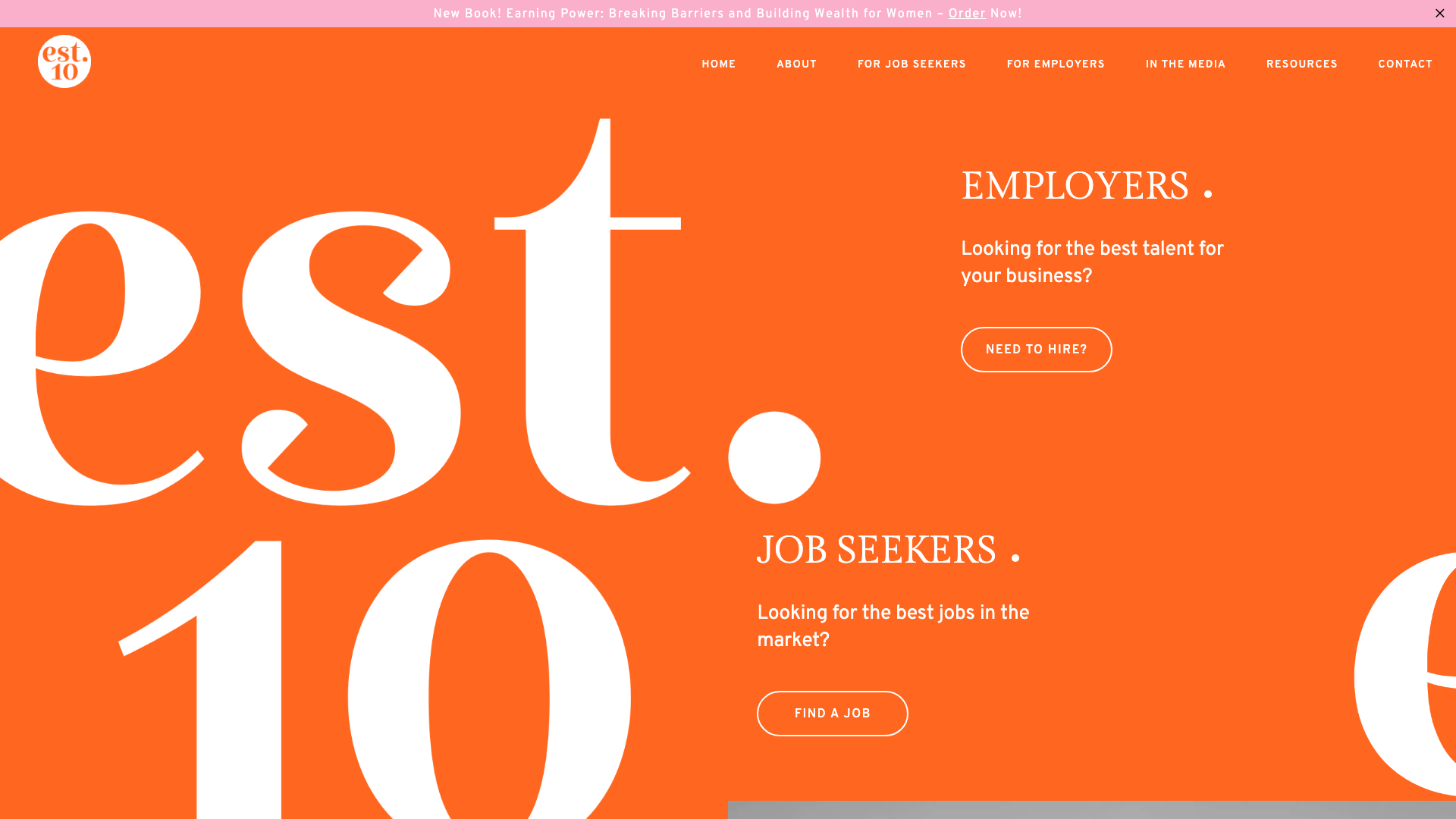
EST10 uses a split-screen hero with decorative imagery on the left and content on the right. Orange is the primary brand accent.
Gilda Display serif headlines sit above sans-serif body text, with a mega-menu and gradient overlays in the navigation.
The serif and sans-serif typography pairing makes the headings visibly different from the body text. That contrast lets a reader pick out the main message before reading the detail.
Check the pairing at small screen sizes too, where large headlines need room to wrap. The typography pairing is worth considering in a brief for website design in Sydney.
3. Mansfield & Co Adelaide
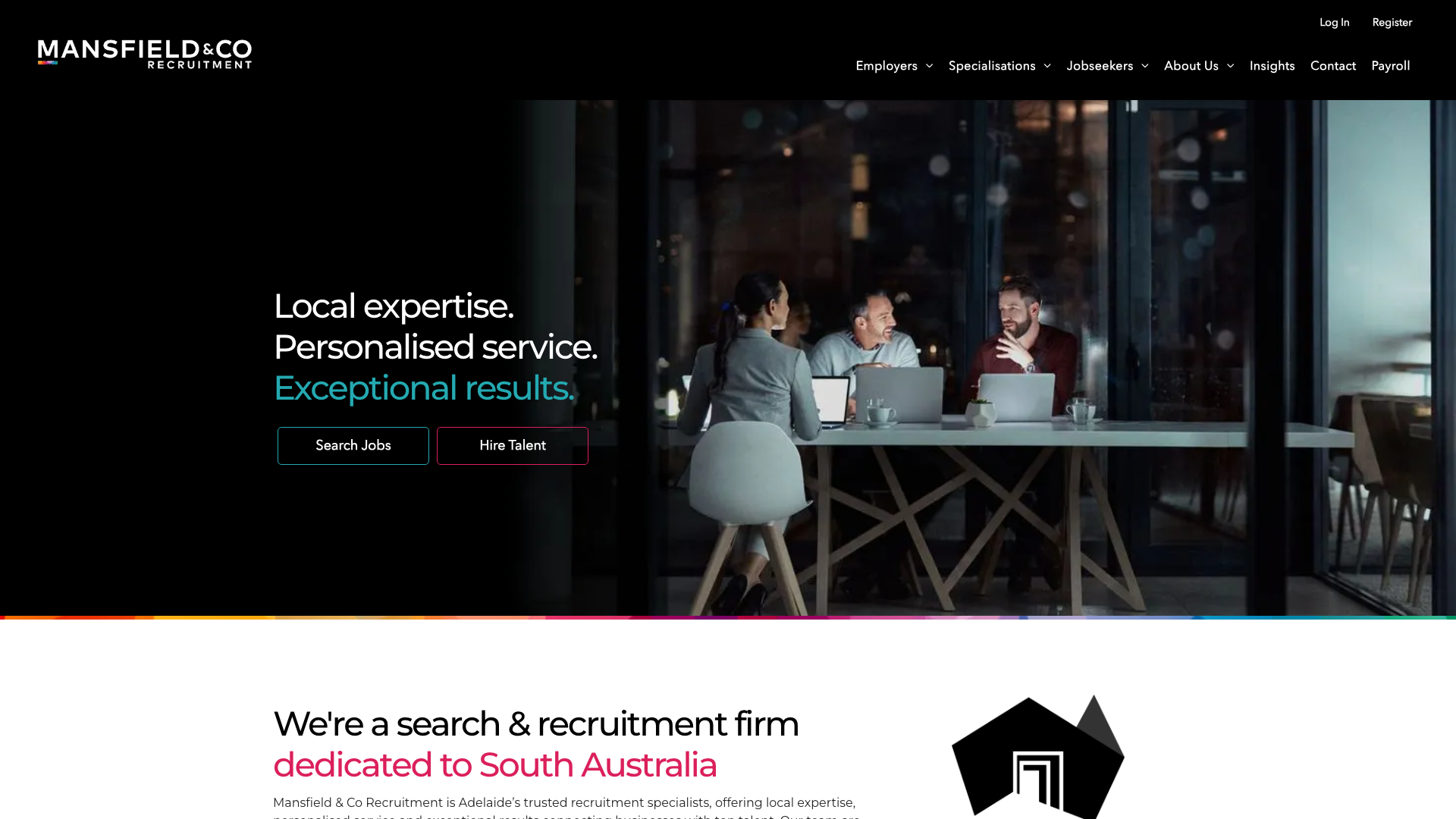
Mansfield & Co cycles through three hero taglines: “Local expertise,” “Personalised service,” “Exceptional results.” Teal and magenta accents sit against a white background.
The cards have generous whitespace, with a client logo carousel providing another visual break.
The dual-tone accent colour system of teal and magenta gives buttons and decorative details two distinct colours to work with. Team photography provides a human introduction alongside the graphic elements.
The rotating taglines communicate three messages without cluttering the hero. For website design in Adelaide, this example shows how two accent colours can distinguish buttons and supporting details.
4. HorizonOne Canberra
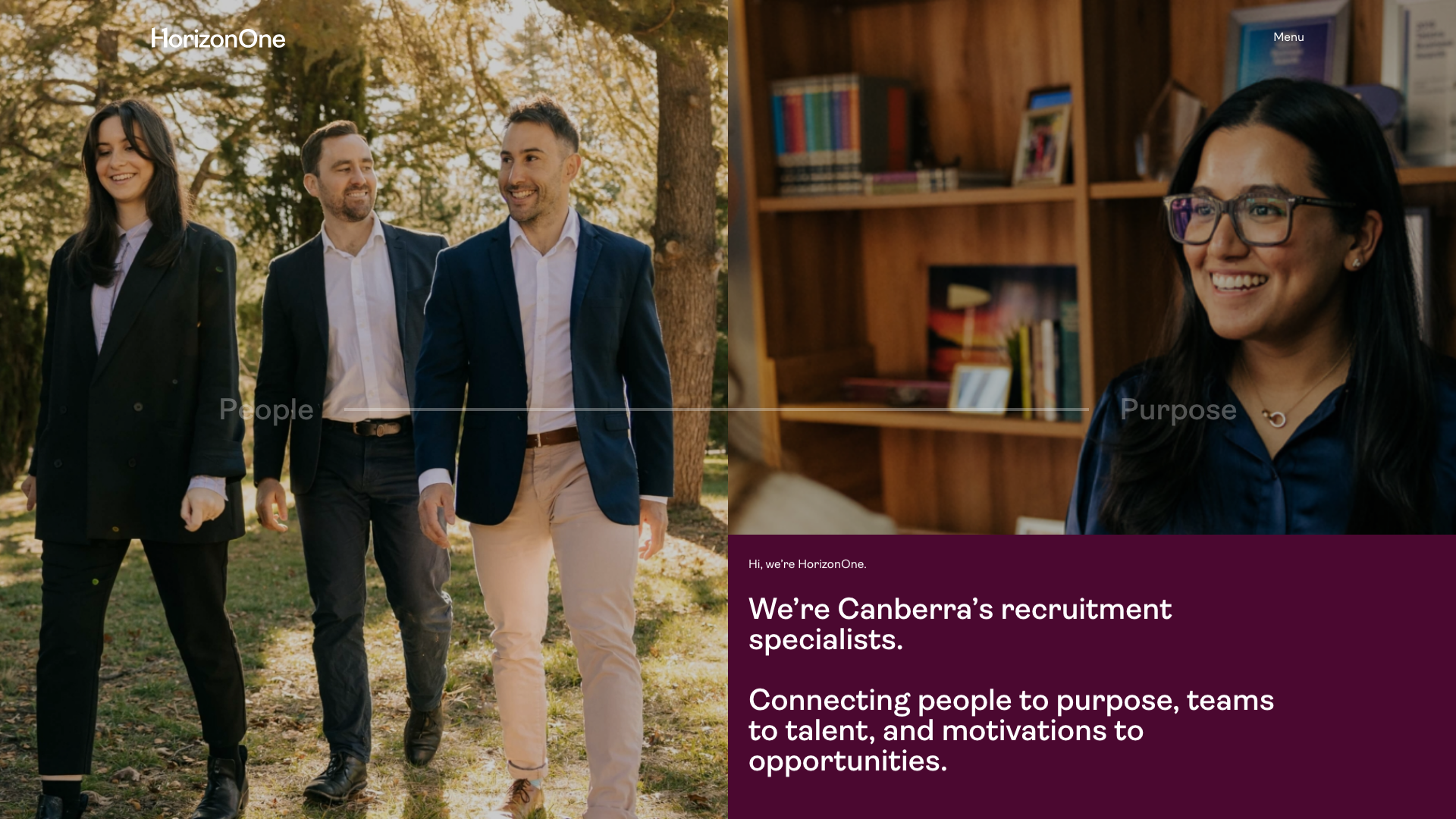
HorizonOne opens with “Hi, we’re HorizonOne. We’re Canberra’s recruitment specialists.” The hero content is aligned to the right.
The “Find work” and “Find talent” buttons sit alongside office and team photography.
The conversational “Hi, we’re HorizonOne” opening creates an approachable brand voice. Each button names a task, so visitors can choose a route before reading the agency introduction.
The labels describe the visitor’s task without requiring them to understand recruitment terminology. An agency planning website design in Canberra can borrow the plain-language button labels without copying the visual style.
5. Rarekind Central Coast

Rarekind leads with “Extraordinary people, exceptional workplaces.” Hand-drawn characters appear in flying and floating poses.
The page uses TT Hoves, dark text on white and generous whitespace.
The custom SVG character illustrations create a distinctive brand identity that is easy to recognise in this shortlist. The poses give the page a playful tone.
The location references span Newcastle, the Central Coast, Western Sydney and the Hunter Valley. Custom illustration offers an alternative to generic office photography.
Custom illustration is one option to discuss when commissioning website design on the Central Coast.
6. Dixon Appointments Melbourne
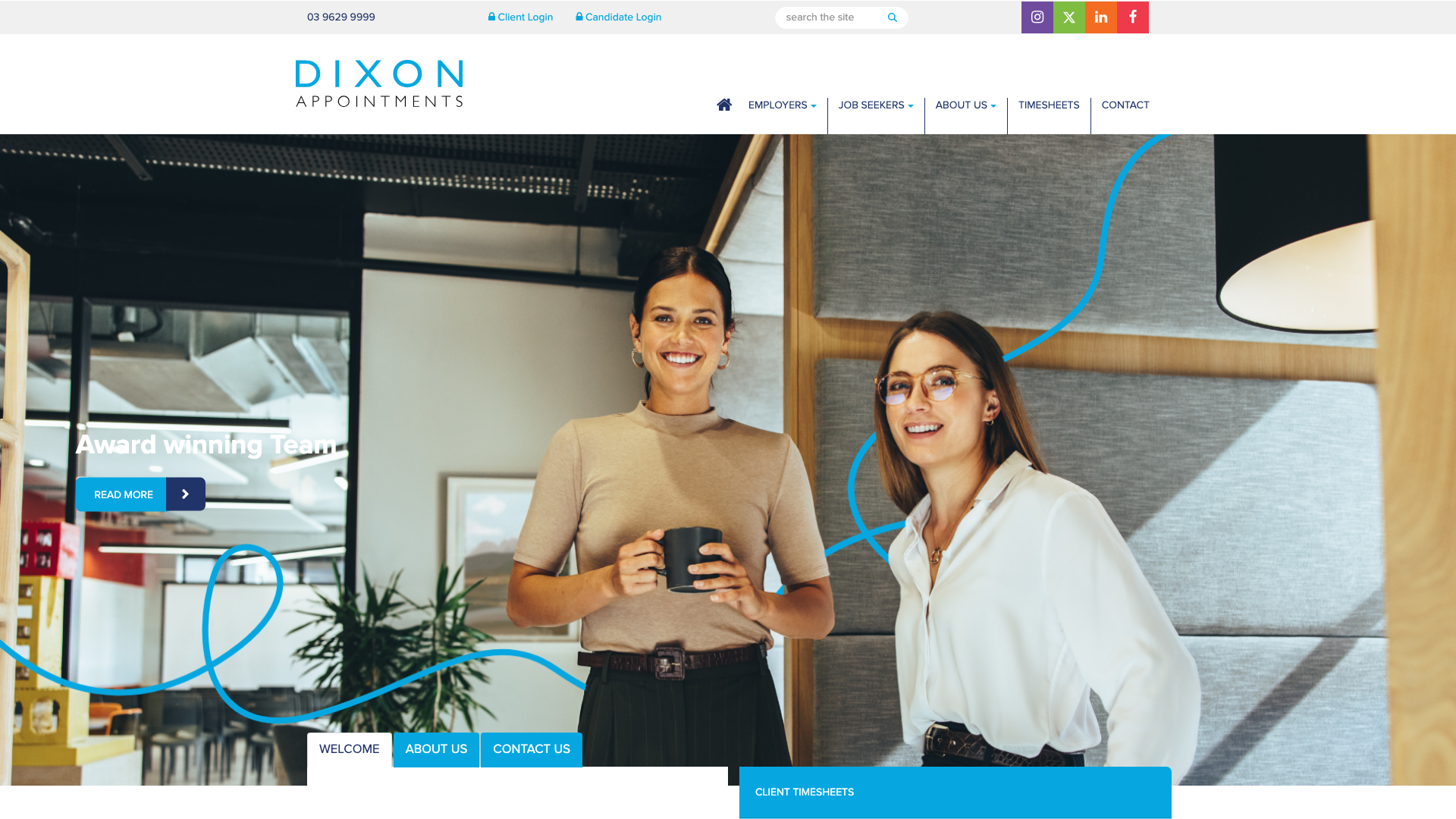
Dixon Appointments rotates through “Award winning Team,” “A personalised approach,” and “Quality assured recruitment” in the hero banner. Navy text and orange buttons sit on white backgrounds, alongside a job search with keyword, classification and location filters.
The integrated job search with filters directly on the homepage gives candidates a practical starting point. Employers still need their own visible route to submit a brief.
The values-driven positioning sets expectations before a candidate even registers. Include job-search filters in a brief for website design in Melbourne when candidates need to narrow a substantial vacancy list.
7. 11 Recruitment Perth
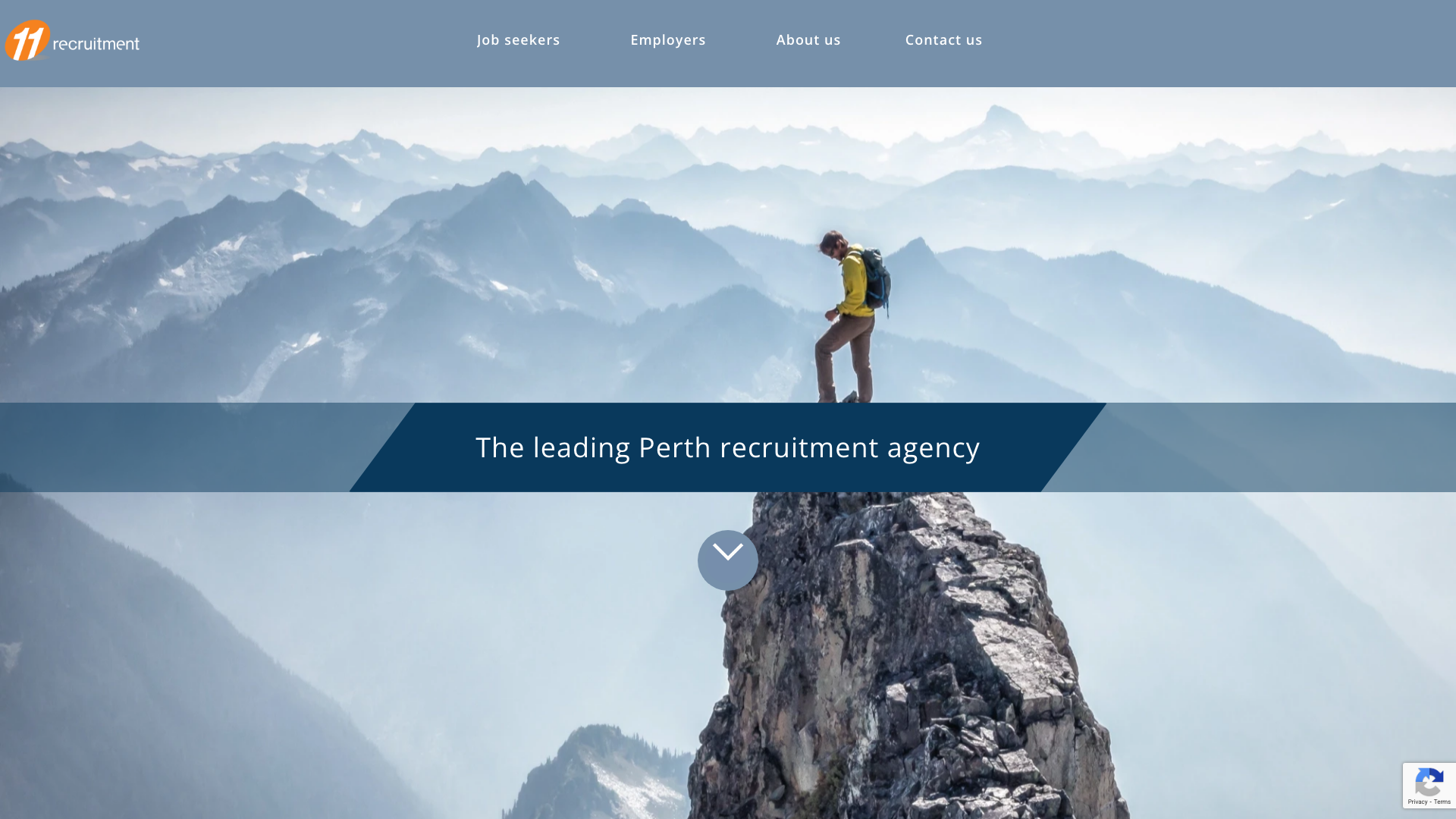
11 Recruitment uses a striking dark navy overlay on professional photography. The headline “Hire high achievers” appears in white text.
Blue and gold accents accompany Open Sans text throughout.
The cinematic hero with dark overlay adds contrast between the headline and the photograph. Gold provides a second accent against the navy background.
The copy positions the agency around white-collar recruitment. This is a useful contrast treatment to consider for website design in Perth, especially when a headline sits over photography.
8. Pure Source Recruitment Brisbane
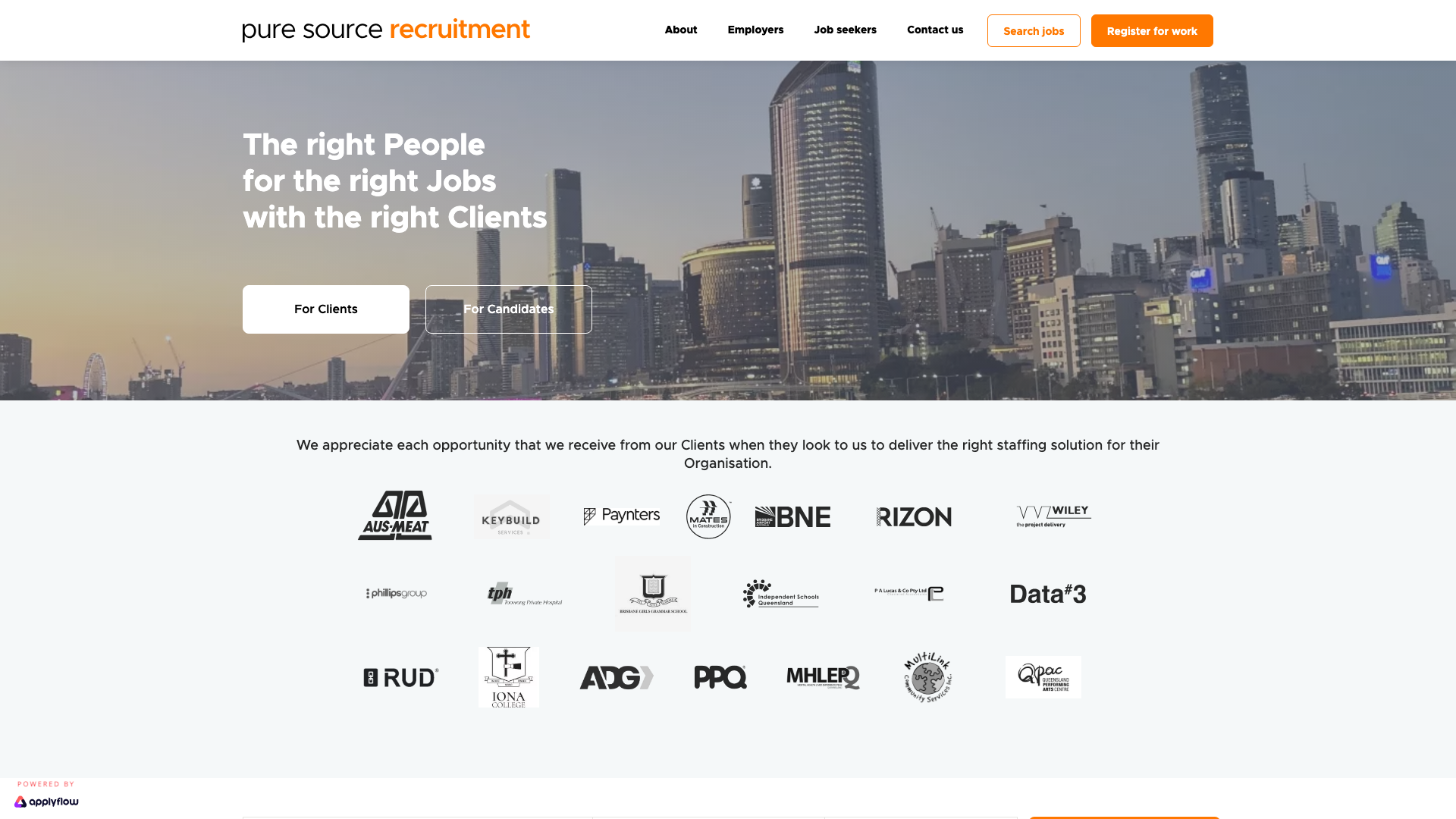
Pure Source Recruitment leads with “The right People for the right Jobs with the right Clients.” The design uses a white background with navy and coral highlights.
A client logo carousel includes Brisbane Airport and Data#3, while team headshots appear in a “People of Pure Source” section.
The fill rate and retention metrics displayed as trust signals set this site apart. The figures are the agency’s own claims, rather than independently verified results.
The design lesson is to put evidence beside the service it supports and explain how each measure was calculated. When planning website design in Brisbane, reserve space for evidence that explains your agency’s recruitment record.
9. Searson Buck Hobart
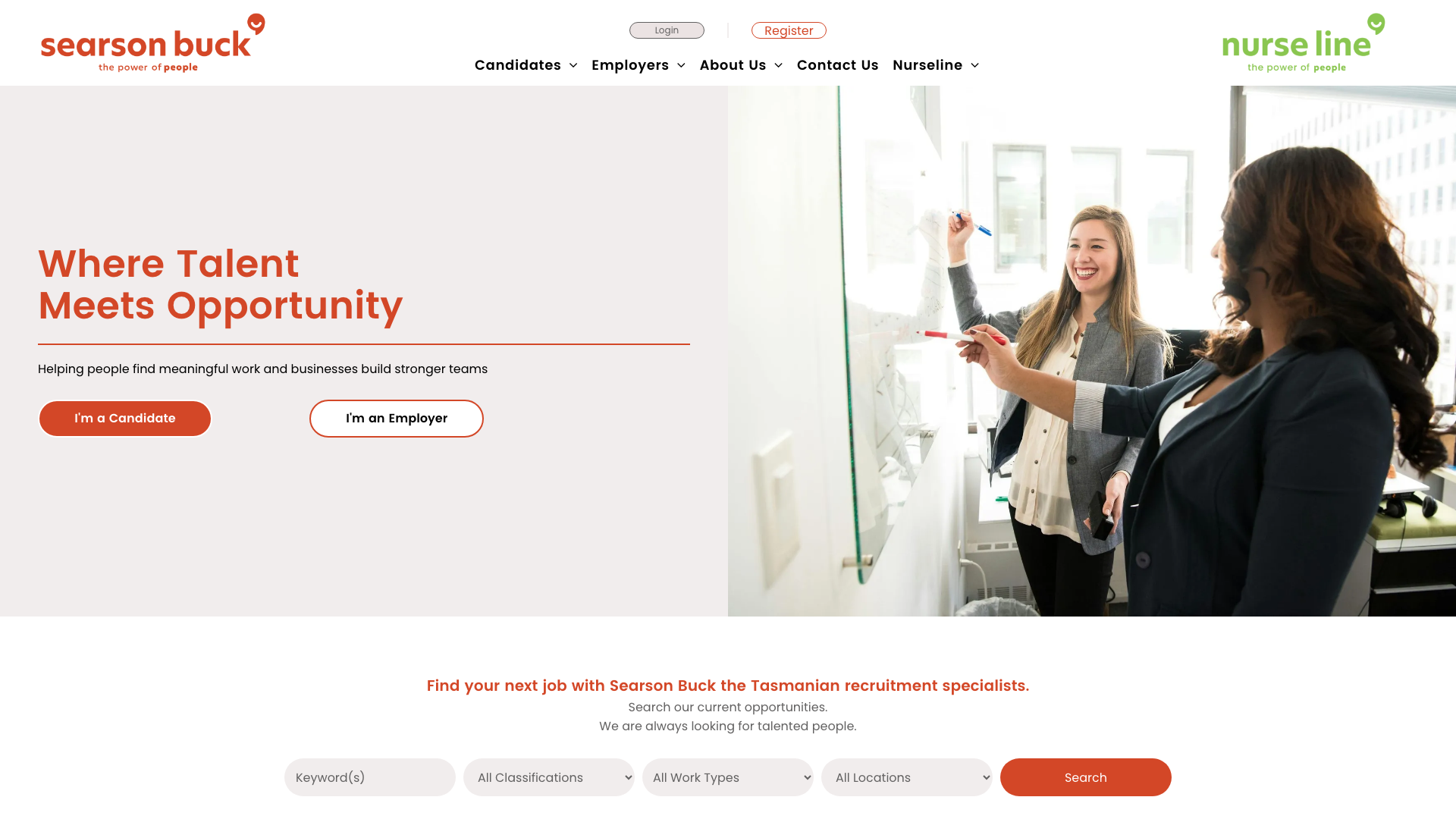
Searson Buck opens with “Where Talent Meets Opportunity” and dual CTAs: “I’m a Candidate” / “I’m an Employer.” Burnt orange is the main accent colour.
Workplace photography sits alongside Poppins and Roboto typography.
The orange brand colour differs from the blue and grey palettes elsewhere in this shortlist. The two audience buttons are easy to distinguish from the surrounding copy.
Carry that clarity through to the next page so each visitor can continue the task they selected. Searson Buck offers a reference for website design in Hobart where both visitor groups need prominent buttons.
10. Verve Partners Newcastle

Verve Partners leads with “We help grow bold careers, cultures and communities” and a “Let’s chat” CTA. The design uses teal accents on white.
Circular icons identify service specialities, with generous whitespace around the team photography.
The conversational “Let’s chat” CTA uses informal language for the contact action. The teal accent separates interface details from the white background.
The regional references name the Hunter, Lake Macquarie and Central Coast. The community-focused messaging positions recruitment as relationship-building rather than transactional.
For website design in Newcastle, pair a conversational contact label with a clear explanation of what happens after an enquiry.
11. RED Appointments Darwin

RED Appointments uses “Creating Positive Partnerships” as the tagline. Red brand accents sit on neutral backgrounds.
The hero gives job seekers and employers separate actions, followed by featured jobs and news.
The featured job listings on the homepage show Northern Territory opportunities immediately. Callback request forms for employer enquiries give employers a route to request a conversation.
The Darwin office gives the broader agency a local point of contact. Agencies considering website design in Darwin can use this layout as a reference for keeping vacancies visible.
12. HRM Sunshine Coast
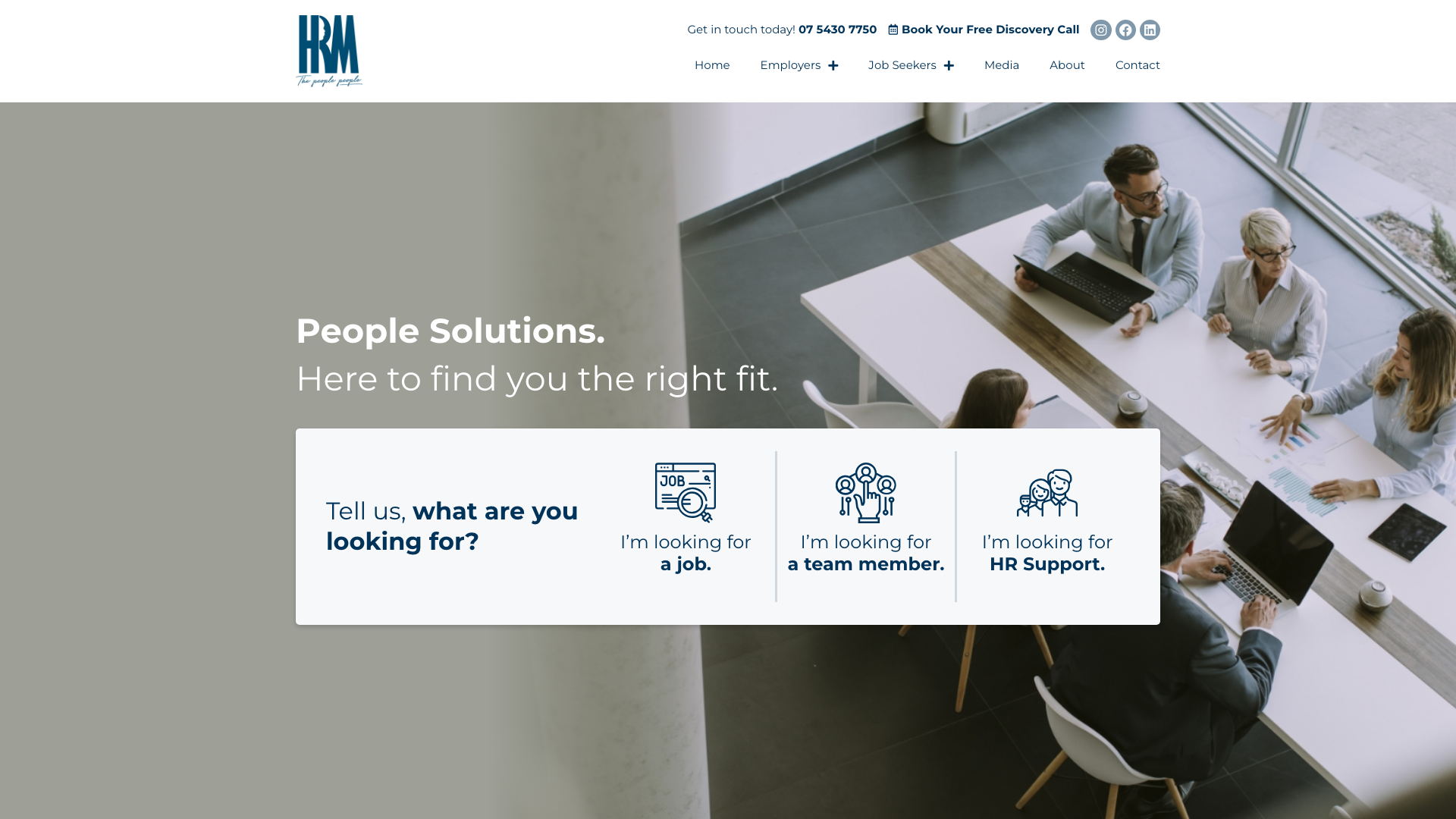
HRM opens with “People Solutions. Here to find you the right fit.” Three buttons provide routes for job seekers, employers and HR support.
The design uses blue and grey, with AHRI and RCSA membership badges visible as trust signals.
The three-pillar navigation for jobs, employers, and HR provides immediate user pathways. The extra HR route suits an agency offering more than recruitment alone.
The member badges add professional credibility. A brief for website design on the Sunshine Coast should account for HR consulting separately when it is part of the agency’s offer.
13. Illawarra Recruitment Wollongong
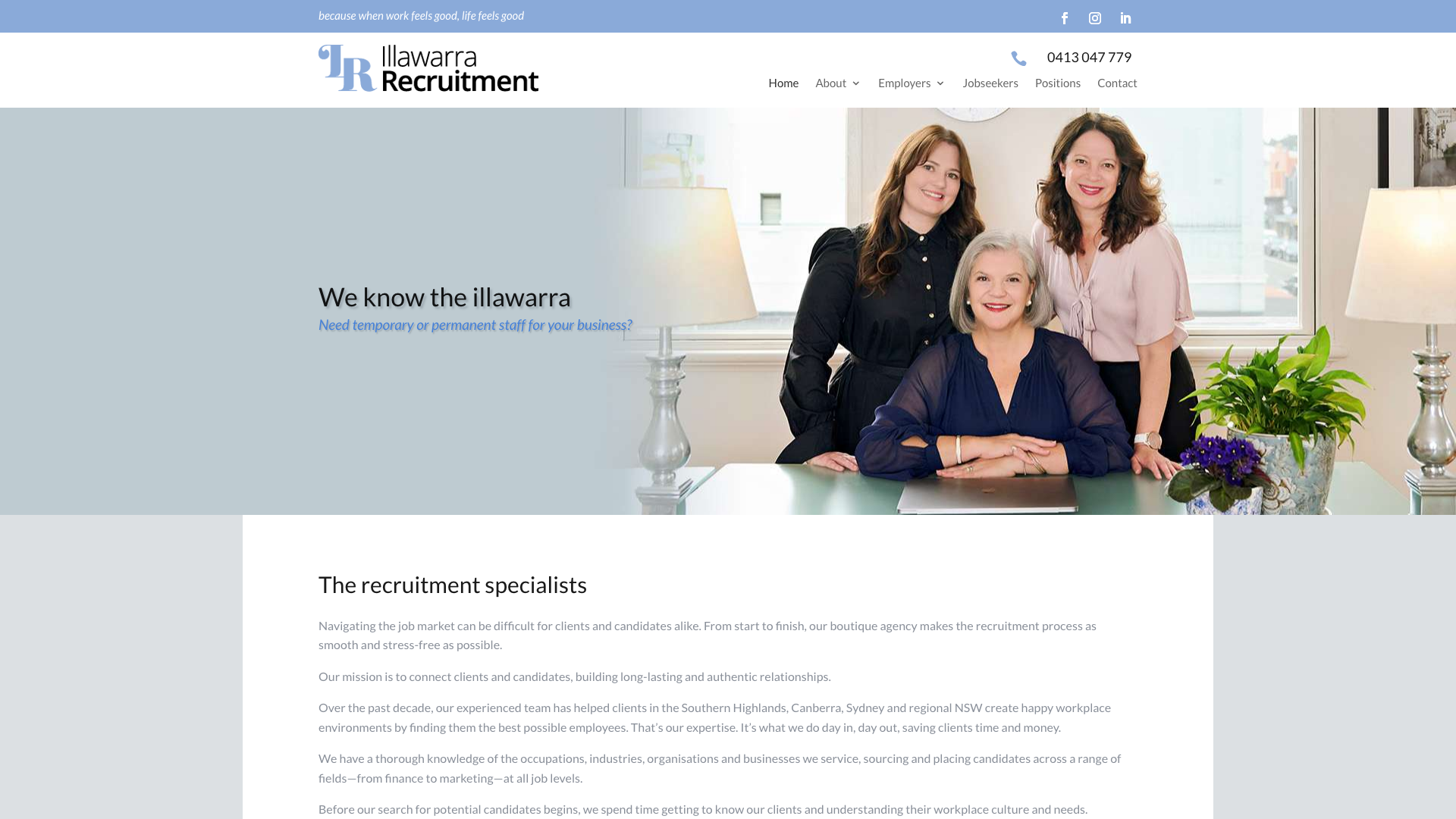
Illawarra Recruitment uses a featured hero image with “Wollongong Recruitment” positioning. Blue is the primary accent colour.
The page pairs Open Sans and Lato with enquiry forms and the tagline “Because the right fit matters”.
The conversion-focused design with prominent enquiry forms puts the contact option close to the service information. The copy names the Illawarra and explains the permanent and temporary staffing focus.
The tagline “Because the right fit matters” is simple and memorable. This example gives agencies planning website design in Wollongong a straightforward way to connect local positioning with an enquiry form.
14. Fruition Recruitment Geelong
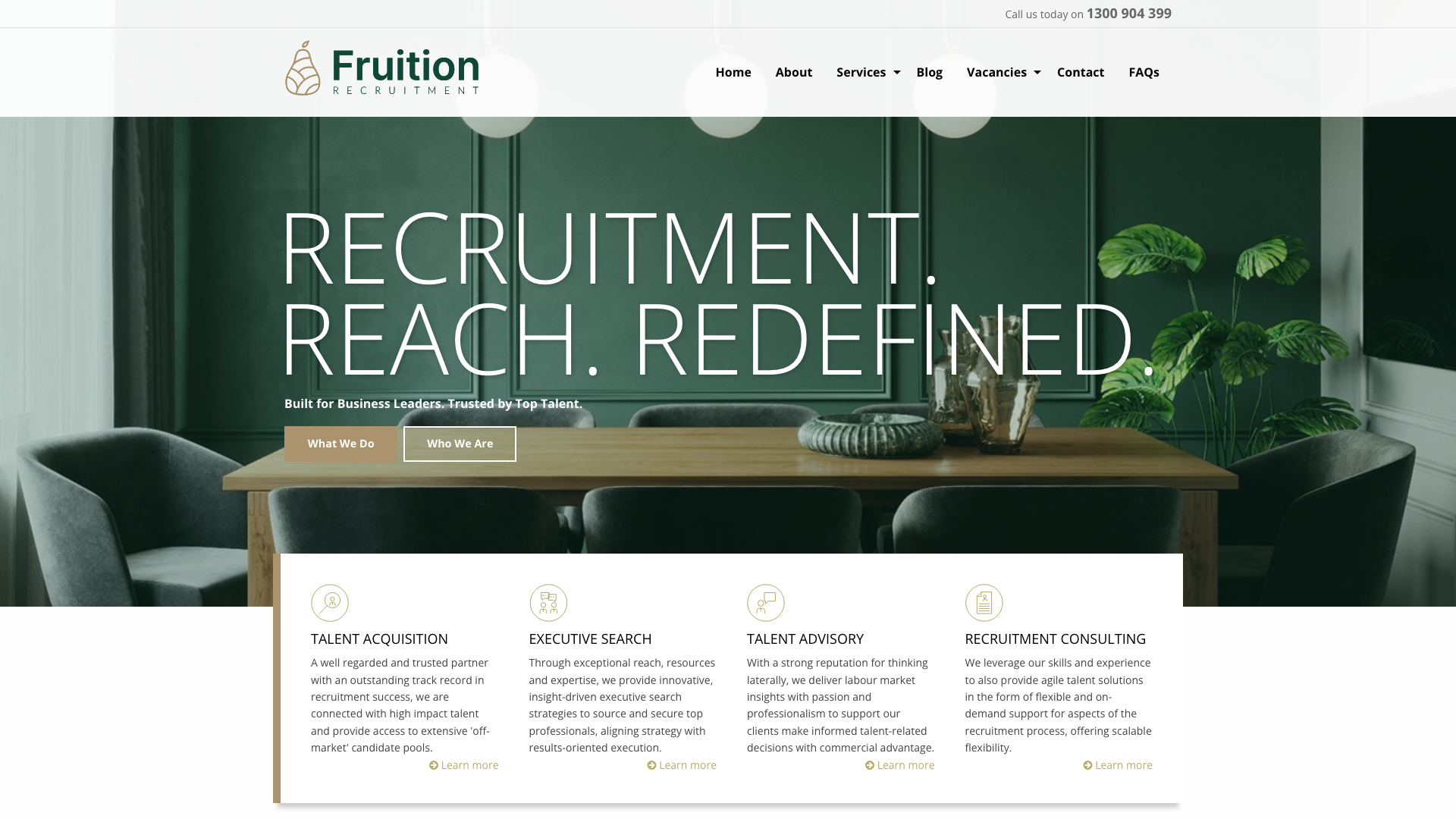
Fruition Recruitment uses a short recruitment-focused headline.
Four service cards cover Talent Acquisition, Executive Search, Talent Advisory and Recruitment Consulting. Local Geelong landmarks appear in the imagery.
An Instagram feed adds another source of imagery to the homepage.
The Instagram feed on the homepage keeps content fresh and shows the team’s personality. Local Geelong landmark photography creates community connection.
The consultation button gives visitors a specific reason to make contact. Recognisable local photography is worth considering for website design in Geelong when the agency’s work is tied to the region.
15. Inspire HQ Ballarat
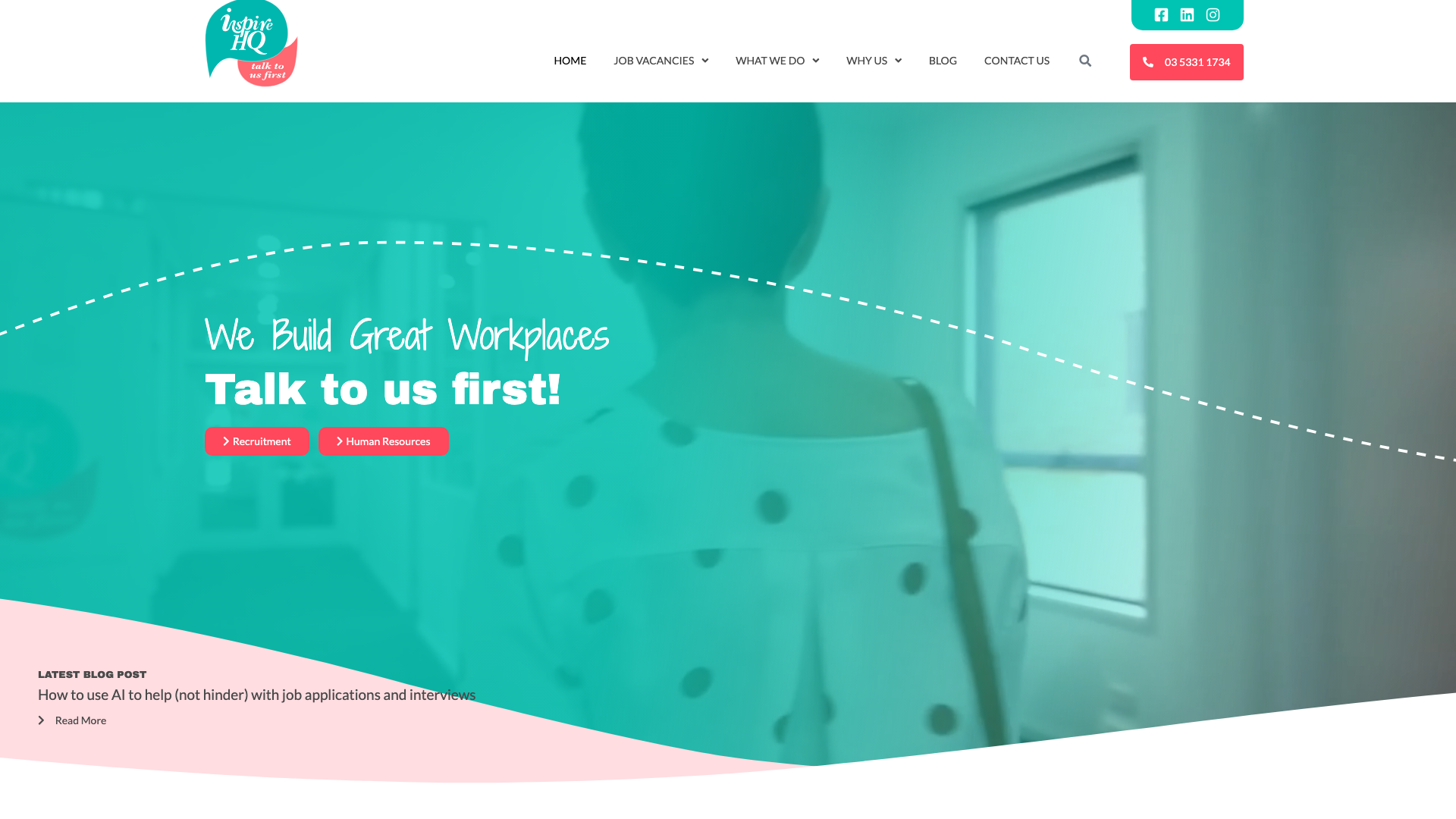
Inspire HQ uses bold coral as the primary accent. Its headline is “We Build Great Workplaces”.
Hand-drawn icons and geometric dot patterns accompany team photos in collaborative settings.
The hand-drawn icon graphics and geometric patterns carry the graphic style through several sections. The coral accent contrasts with the cooler palettes elsewhere in this shortlist.
The location information identifies the agency’s Ballarat presence. For website design in Ballarat, these graphic details offer an alternative to relying entirely on office photographs.
16. ESE Consulting Bendigo
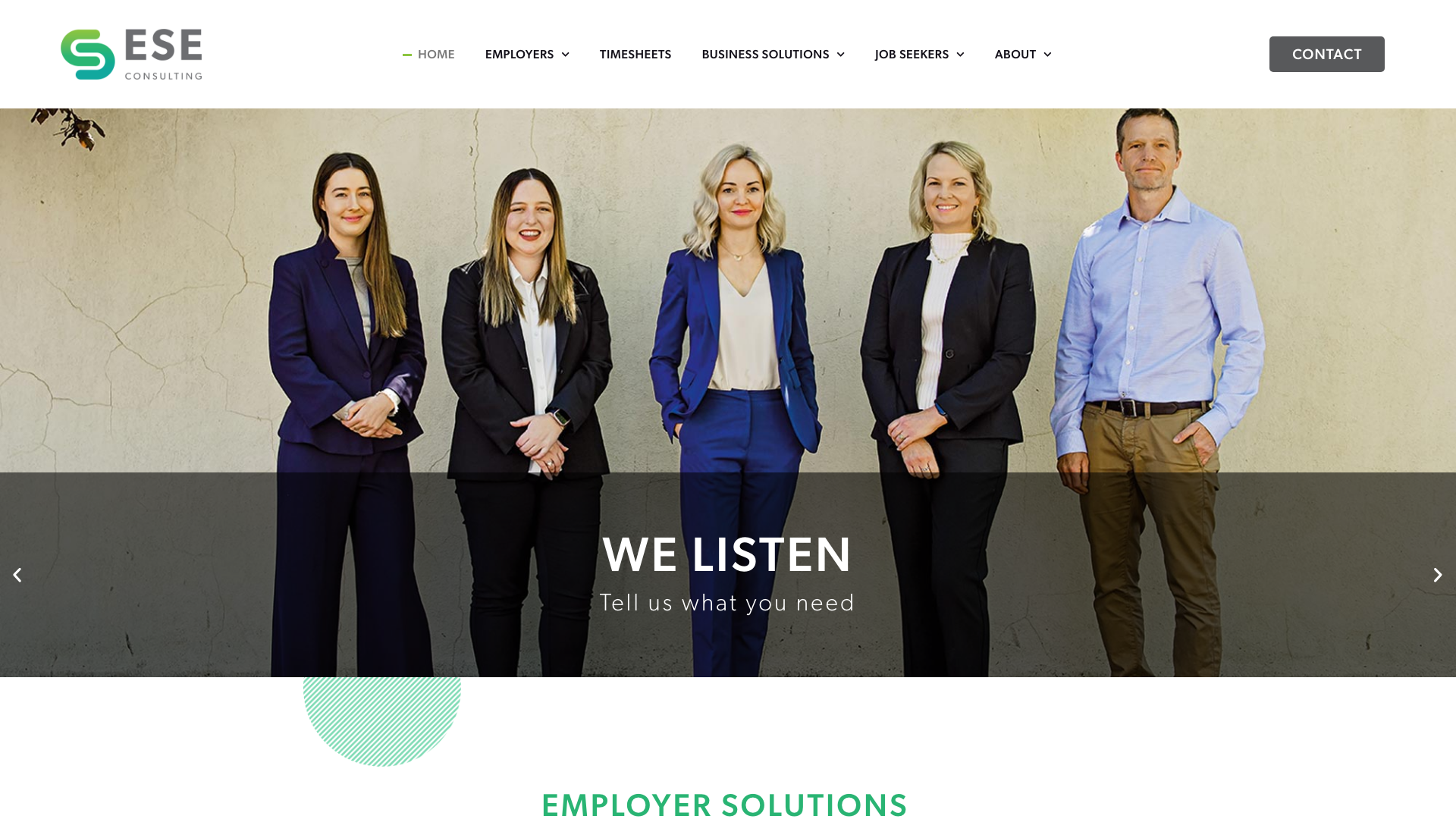
ESE Consulting uses turquoise and light green striped accent graphics with neutral tones. Employer and candidate services have separate sections.
Client and candidate feedback sit in a testimonial section with restrained decoration.
The decorative striped pattern graphics replace traditional stock photography, creating a distinctive visual brand. The employer and candidate sections give the restrained layout a clear purpose.
Keep those explanations readable when adapting this approach to a smaller screen. Agencies commissioning website design in Bendigo can take a similar approach to separating employer and candidate content.
17. Healthcare Access Port Macquarie
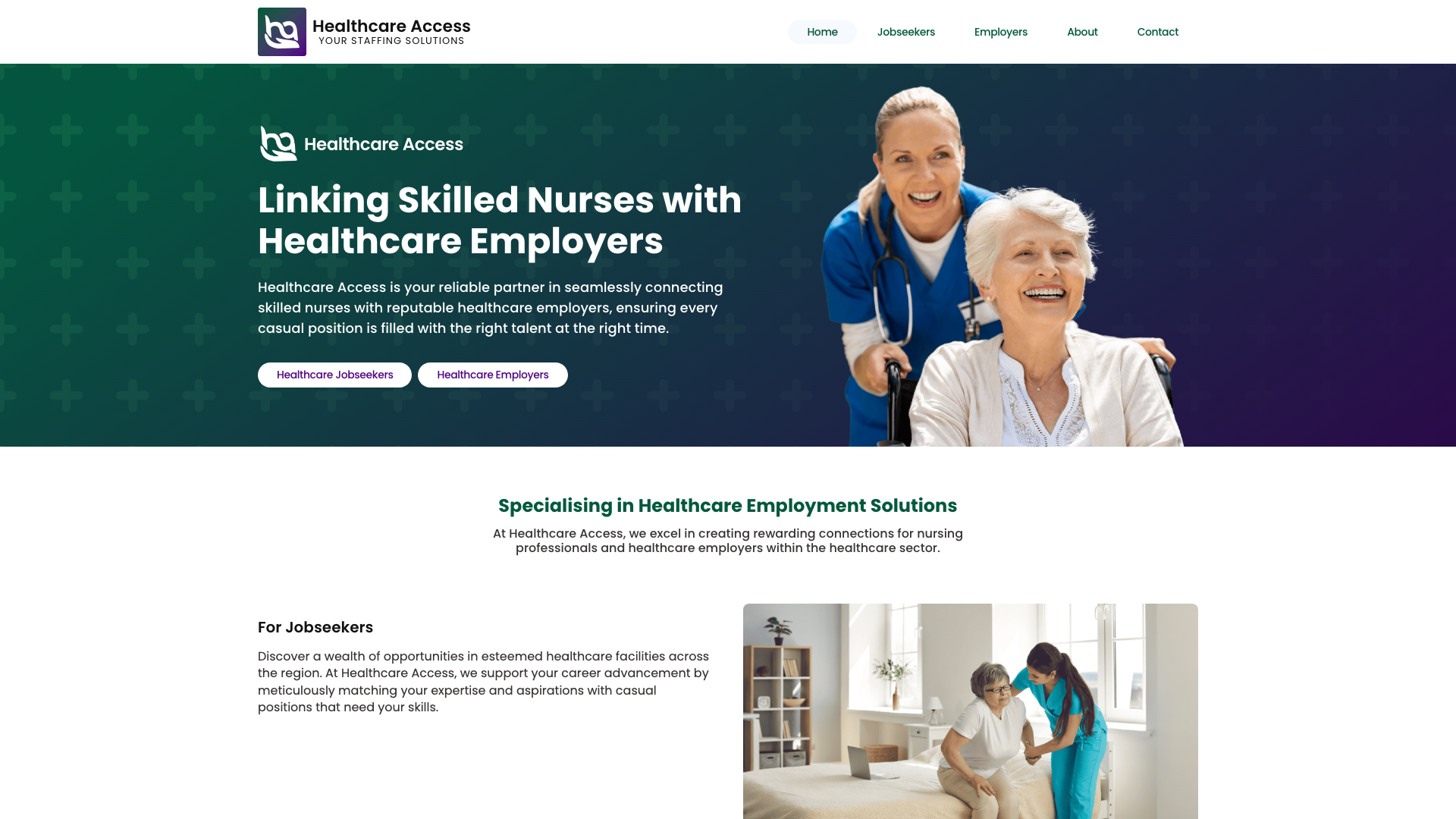
Healthcare Access leads with a hero photograph of healthcare professionals and “Linking Skilled Nurses with Healthcare Employers,” splitting the audience with dual CTAs: “Healthcare Jobseekers” and “Healthcare Employers.” Alternating image-and-text sections address each audience separately. A six-column core values grid and tabbed three-step process section let visitors switch between jobseeker and employer pathways.
The tabbed process section switching between jobseeker and employer journeys in the same space keeps each process explanation in the same area of the page. Two completely different audiences can self-select their pathway without either feeling like an afterthought.
Healthcare staffing is a specialist niche, and the site communicates that focus clearly. For healthcare recruiters considering website design in Port Macquarie, the useful idea is a separate process explanation for each audience.
What makes great recruitment websites easy to use?
Across these examples, the most useful design ideas concern the next action a visitor can take. HorizonOne’s two buttons and Dixon’s search filters solve different tasks; neither proves a conversion result on its own.
Dual pathways that split visitors in the first screen
Candidates want open roles and an easy application process. Employers want proof you can fill positions quickly and with the right people.
Searson Buck, HorizonOne, and Healthcare Access split those audiences from the hero with separate CTAs. One button for each.
Make the two routes visible before asking visitors to read a long introduction. Then check that the candidate route reaches jobs or registration, while the employer route explains how to request staff.
Job search that earns its homepage placement
Dixon Appointments and RED Appointments both put job search on the homepage, and it works because they have active listings behind it. A search bar that returns nothing is worse than no search bar at all.
If your agency runs a steady pipeline of roles, put search front and centre. If you have a handful at any given time, a “View available opportunities” link is more honest.
Team photography over stock imagery
Mansfield & Co, Inspire HQ, and Verve Partners all feature their actual teams. Team photos let visitors see who they might speak to. Add names and roles so the images provide useful information as well as a personal introduction.
Social proof that corporate buyers trust
Client logos, fill rate metrics, industry body badges (AHRI, RCSA), and named testimonials. A procurement manager may also need evidence relevant to the roles and industries they are hiring for.
Pure Source displays fill rate and retention data. HRM shows AHRI and RCSA membership.
When using similar evidence, identify the source and period for any metric and link membership claims to a verifiable listing.
A colour palette that breaks from blue and grey
Several sites in this shortlist use blue, while others choose warmer accents or a dark background.
The most memorable sites here use coral (Inspire HQ), burnt orange (Searson Buck), dark themes (Whitefox), or teal-and-magenta combinations (Mansfield & Co). If your competitors all look the same, colour is a free way to stand out without doing anything radical.
Pages Every Recruitment Website Needs
Use the examples to plan pages around visitor tasks. This checklist is a starting point: the right structure depends on your agency’s services and how it accepts applications.
- Homepage with audience split. Two clear paths from the hero. Candidates go one way, employers go the other.
- Jobs or opportunities page. Filterable by location, industry, and role type at minimum. If your ATS supports salary range filters, add them. Filters can help candidates narrow a long list of vacancies.
- Employer services page. What you do, which industries you cover, how the process works. This is where corporate buyers evaluate you against competitors. Spell out your specialisms rather than hiding behind “end-to-end recruitment solutions.”
- Candidate registration or apply page. Short form, CV upload, clear next steps. Ask only for information needed at that stage, and explain what happens after submission.
- Specialism or industry pages. If you recruit for healthcare, construction, and IT, each needs its own page with relevant language and roles. This also helps with SEO for your recruitment website by giving a specific service a page that answers a focused search, such as “healthcare recruitment Sydney”.
- About page with team profiles. Names, photos, LinkedIn links. Candidates want to know who will be managing their application. Employers want to know the consultant handling their brief.
- Contact page with multiple channels. Phone, email, office address, and a form. Some candidates prefer calling. Some employers prefer email. Give them both.
How Recruitment Websites Handle the Two-Audience Problem
Candidates and employers arrive with different tasks.
Put too much candidate content above the fold and employers scroll past. Lead with employer content and candidates assume there are no jobs listed.
The sites on this list take different approaches:
- Hero-level split. Two buttons, two paths. “I’m looking for work” / “I need to hire.” Searson Buck and HorizonOne do this well.
- Navigation-level split. Separate top-level nav items for employers and candidates, each leading to tailored content. HRM uses three pillars (jobs, employers, HR) because their business also offers HR consulting.
- Tabbed or sectioned homepage. Healthcare Access uses a tabbed process section that swaps content depending on which audience selects their tab. More complex to build but effective when you want both journeys visible on one page.
Whichever layout you choose, carry the audience labels through the navigation and destination pages.
What Separates a Recruitment Website That Converts From One That Just Looks Good
A recruitment website can look polished while leaving practical tasks unfinished. Use the designs above as inspiration, then test the complete candidate and employer journeys on your own site.
Speed matters more than animation. Test the job list and application form on a phone, including any embedded recruitment software.
A homepage screenshot cannot tell you whether those pages load quickly or whether an upload succeeds. Good website design that accounts for performance starts with these tasks before the visuals are locked in.
Specificity beats broad claims. “We recruit across all industries” tells an employer nothing useful.
“We specialise in healthcare, construction, and executive search across South East Queensland” tells them whether you are worth calling. Whitefox names its region.
HRM names its service lines. Illawarra Recruitment names its city.
Name the roles and regions you actually serve.
Forms should match the conversion. A candidate applying for a warehouse role should not face the same form as an employer briefing a senior executive search. Keep candidate forms short.
Give employers room to describe what they need. The mismatch is common and costs applications at both ends.
Compare candidate and employer tasks before choosing a design
For this shortlist, compare the visible design choices against the tasks your agency needs to support. HorizonOne makes the audience split explicit; Dixon gives candidates search filters; Healthcare Access separates the explanation of each process.
- Can a candidate identify a suitable role and find the application button without opening several menus?
- Can an employer see your recruitment specialisms and reach the person who handles a brief?
- Does each enquiry or application end with an explanation of what happens next?
These checks give you a reason to choose a layout beyond its colour palette. For a broader review of your existing site, use our business website audit process to record the problems before commissioning changes.
Keep vacancies accurate after the redesign
The job board needs an owner after launch. Agree who checks failed application emails, removes filled roles and tests the connection to recruitment software after updates.
- Submit a test application and confirm it reaches the intended system.
- Close a test vacancy and check that its public listing changes as expected.
- Check the empty-results message and offer a way to register interest.
Include those checks in ongoing website management for your recruitment site, with responsibility for the recruitment software agreed separately.
Need a Recruitment Website?
Start by identifying where candidates or employers get stuck on your existing site. That gives the redesign a practical brief, whether the problem is buried vacancies, an unclear specialism or an awkward enquiry form.
We build recruitment websites that serve both candidates and employers. Clean design, job board integration, team profiles, and a site that communicates your agency’s personality.
See our recruitment website design service or compare website design pricing to get started. If you want to talk through what your agency needs, contact KC Web Design about your recruitment website.
Recruitment Website Design FAQs
Comparing recruitment website scope and platforms
How much does a recruitment website cost in Australia?
A recruitment website quote depends on the work involved: a simple opportunities page, a searchable job board, and a candidate portal are different scopes. Ask for the website build, recruitment software fees, integration work and ongoing support to be itemised separately.
Compare quotes against the same candidate and employer tasks. A lower build price tells you little if it excludes the application flow your agency needs or leaves staff maintaining listings in two systems.
Do recruitment agencies need a job board on their website?
Not always. A searchable job board is useful when candidates need filters to find relevant vacancies, as the Dixon Appointments example illustrates.
For a small number of specialist placements, a short opportunities page may be easier to use. Choose based on how people find and apply for your roles, rather than an arbitrary minimum number of vacancies. Always provide a useful next step when no suitable roles are available.
What is the best platform for a recruitment website?
The best platform depends on the job board and application flow your agency needs. For example, WP Job Manager’s documented features include searchable listings, individual job pages and email or link-based application options for WordPress.
That does not establish compatibility with your applicant tracking system. Ask for a demonstration using your intended software, including how a vacancy is published, where an application goes and how a filled role is removed. Compare a general website platform with a recruitment-specific service against those same tasks.
Planning candidate and employer journeys
Should a recruitment website separate candidate and employer content?
Yes: give candidates and employers their own clear routes, as HorizonOne and Healthcare Access illustrate. Candidates need vacancies or registration; employers need information about the agency’s specialisms and a way to submit a brief.
The routes can start with buttons, navigation labels or separate homepage sections. Keep the wording consistent on the destination pages so visitors know they have chosen the right path. A visually balanced homepage still needs useful content behind both buttons.
How do recruitment websites handle ATS integration?
An applicant tracking system (ATS) connection can publish vacancies to a website and send applications back to the recruitment system, depending on the integration. Other setups send candidates to an externally hosted application page.
Before choosing the design, confirm which fields sync, how often updates happen and whether CV uploads reach the intended record. Test failed submissions and closed vacancies as well as a successful application. Avoid assuming that a plugin or an embedded form provides a complete two-way connection.
What pages should a recruitment agency website have?
Start with a homepage, jobs or opportunities, employer services, candidate registration, team information and contact details. Add specialism pages where you have distinct services and enough useful information to justify them.
The checklist above explains each page’s job. Smaller agencies may combine some content; agencies with several recruitment divisions may need separate routes. Judge the structure by whether both audiences can complete their tasks, rather than whether it matches another agency’s page count.
Checking mobile usability and search visibility
How important is mobile design for recruitment websites?
Mobile design matters throughout the application, including pages hosted by another provider. A responsive homepage alone does not tell you whether a candidate can filter roles, read a job description and upload a CV on their phone.
Try the complete route on a small screen and check labels, error messages and confirmation screens. Repeat the check for the employer enquiry form. This comparison does not include measured mobile usability scores, so treat each example as a design reference rather than a tested performance recommendation.
How can a recruitment website improve its search rankings?
For job pages, Google’s JobPosting guidance explains how structured data can make an individual vacancy eligible for its job-search experience. It belongs on a page for one job, not a search-results page, and expired vacancies need appropriate handling.
Eligibility does not guarantee appearance or a ranking. Keep job descriptions accurate and make specialism pages useful to the people considering your agency; do not rely on adding markup to compensate for incomplete information.
What trust signals work best on a recruitment agency website?
Use evidence that helps someone evaluate the service: named client feedback, relevant experience and clearly explained placement figures. The Pure Source example illustrates how metrics can be given space in the layout; it does not independently validate those figures.
For every statistic, state the period and what was measured. Keep membership claims verifiable, and use testimonials with permission. Candidates also need clear information about who handles their application and what happens after they submit it.
Before approving a recruitment website, test both routes: find and apply for a suitable role, then submit an employer enquiry. Check the confirmation messages and who receives each submission.






